

Description
Vibrant Chrome Theme with Dynamic Splashes
Overview
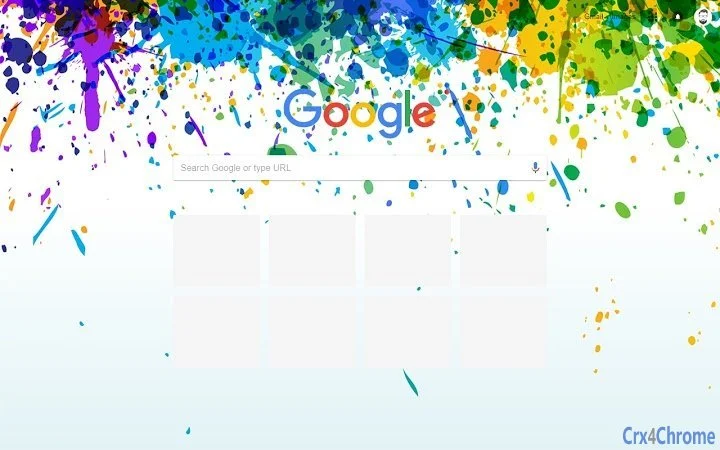
The Colors theme is a visually striking browser theme designed for Google Chrome, offering a dynamic and colorful 'paint splashes' aesthetic. It transforms the Chrome interface with vivid, abstract color patterns, enhancing the visual experience for users who value creative expression in their digital workspace. The theme is ideal for individuals seeking to personalize their browsing environment with a lively, artistic touch.
Targeted primarily at casual users and creative professionals, Colors caters to those who use Chrome as their primary browser and wish to make their desktop stand out with a unique visual identity. The theme is especially suited for screens with resolutions up to 2560x1600, ensuring optimal display quality on high-definition monitors. It is not intended as a productivity tool but rather as a cosmetic enhancement to the browsing interface.
Developed by Chris Prins, the theme is open source, reflecting a commitment to transparency and community-driven development. This allows users to explore, modify, and contribute to the theme’s codebase. The theme is available at no cost through the Google Chrome Web Store, making it accessible to a broad audience.
Key Features & Capabilities
- Dynamic Paint Splash Design – Features vibrant, abstract color splashes that animate subtly across the browser’s background, creating a lively and engaging visual experience.
- Resolution-Optimized Layout – Engineered for screens up to 2560x1600, ensuring clarity and visual consistency across high-resolution displays.
- Redesigned Inactive Tab Styling – Version 2.3 introduced a refreshed look for inactive tabs, improving visual harmony and reducing interface clutter.
- Open Source Accessibility – The theme’s code is publicly available on GitHub, enabling users to inspect, customize, or contribute to future updates.
- Seamless Chrome Integration – Automatically applies to the Chrome interface without requiring additional configuration or system permissions.
Users can apply the theme with a single click from the Chrome Web Store, making it ideal for those who want immediate visual customization. The theme is particularly effective when used alongside minimalist or neutral browser extensions, allowing the colors to take center stage. It is also suitable for creative workflows where visual stimulation supports inspiration.
User Interface, Workflow & Performance
The user interface of Colors is entirely contained within the Chrome browser’s native UI, with no additional panels, menus, or overlays. The theme modifies only the background and tab appearance, preserving the original layout and functionality of Chrome. Navigation remains unchanged, ensuring that users experience no disruption to their browsing habits.
Workflow efficiency is maintained since the theme requires no setup or ongoing management. Once installed, it functions automatically. The developer did not specify resource usage details, but as a static theme with minimal animation, it is expected to have negligible impact on system performance. No reports of instability or crashes have been documented.
Performance observations are based on general software behavior patterns. The theme does not introduce additional processes or background services. It relies solely on Chrome’s rendering engine, which ensures compatibility and stability across supported platforms.
Compatibility & System Requirements
Colors is compatible with Windows, Mac, and Linux operating systems, allowing broad accessibility across desktop environments. It is designed specifically for Google Chrome, meaning it will only function within that browser and does not extend to other platforms or applications.
The installation size is 1.5 MB, which is minimal and suitable for devices with limited storage. The theme is optimized for screens with a maximum resolution of 2560x1600, ensuring visual fidelity on high-definition displays. The developer did not provide additional system requirements beyond this.
Exact system requirements were not listed. Compatibility information was partially provided, focusing on OS support and resolution limits. No specific CPU, RAM, or GPU requirements were specified.
Pros and Cons
Pros
- Visually engaging design with dynamic color splashes
- Optimized for high-resolution screens up to 2560x1600
- Free to download and use with no hidden costs
- Open source, allowing transparency and community contributions
- Easy one-click installation via Chrome Web Store
Cons
- Only compatible with Google Chrome, not other browsers
- No customization options beyond the default design
- Minimal functionality beyond visual enhancement
- Performance impact not officially documented
- Not suitable for users seeking productivity-focused tools
FAQ Section
Is Colors compatible with all versions of Chrome?
The theme is designed for Chrome Version 69 and later, with updates in version 2.3 specifically addressing compatibility with newer Chrome releases. Users on older versions may experience display inconsistencies.
Is the theme safe to install?
Yes, the theme is distributed through the official Google Chrome Web Store and is subject to Google’s security review process. It does not collect user data or install malicious components.
Can I update the theme automatically?
Yes, updates are delivered automatically through the Chrome Web Store when available. Users will be notified of new versions, and the update process is seamless.
What type of license does Colors use?
The theme is open source and available under a permissive license. The exact license type is specified in the GitHub repository, which users can review for full details.
Can I use this theme offline?
Yes, once installed, the theme functions entirely offline. No internet connection is required to view or use the visual elements.
Final Thoughts
Colors delivers a bold, artistic transformation of the Chrome browser interface with its vibrant paint splash design. While it serves no functional purpose beyond aesthetics, its visual appeal and seamless integration make it a standout choice for users who value personalization. The open-source nature adds credibility and fosters community involvement, while the free availability ensures broad access.
It is best suited for casual users, digital artists, and anyone who enjoys a lively, expressive desktop environment. For those seeking a simple, beautiful way to refresh their browser experience, Colors is a compelling option.
Download Colors now to transform your Chrome browser into a dynamic canvas of color.
Guides & Tutorials for Colors Theme for Chrome
How to install Colors Theme for Chrome
- Click the Preview / Download button above.
- Once redirected, accept the terms and click Install.
- Wait for the Colors Theme for Chrome download to finish on your device.
How to use Colors Theme for Chrome
This software is primarily used for its core features described above. Open the app after installation to explore its capabilities.
User Reviews for Colors Theme for Chrome 0
No reviews found





